Quick summary
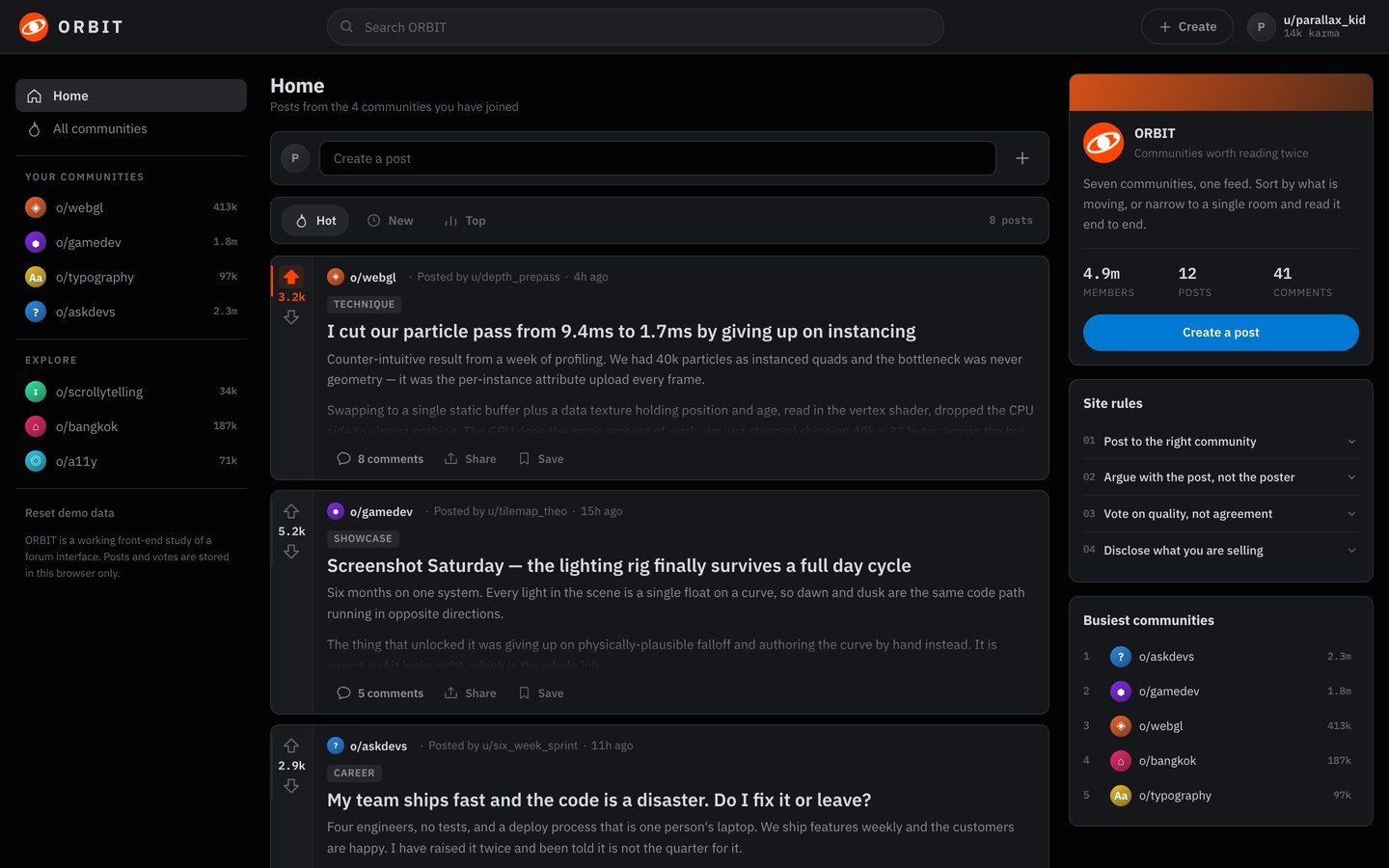
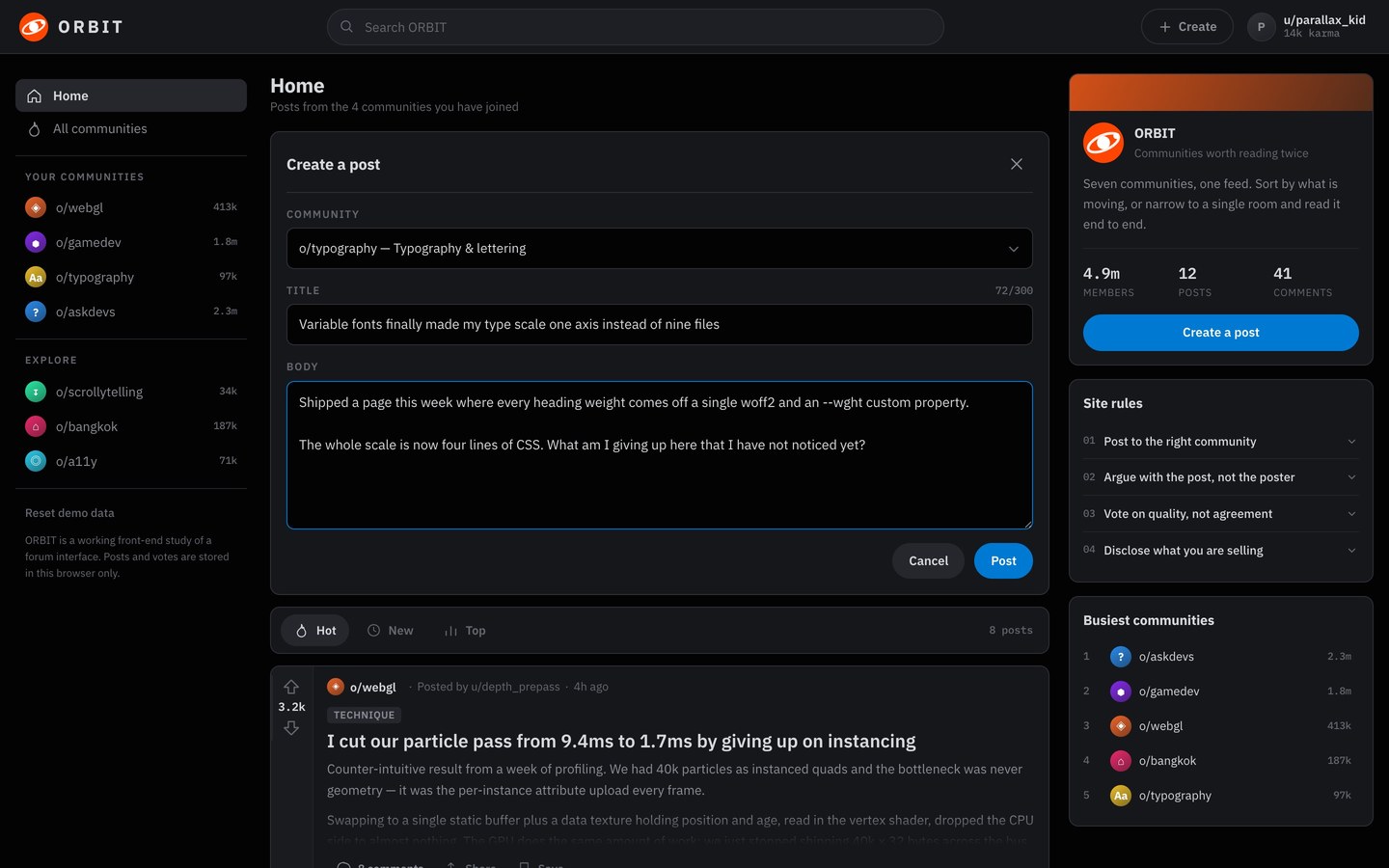
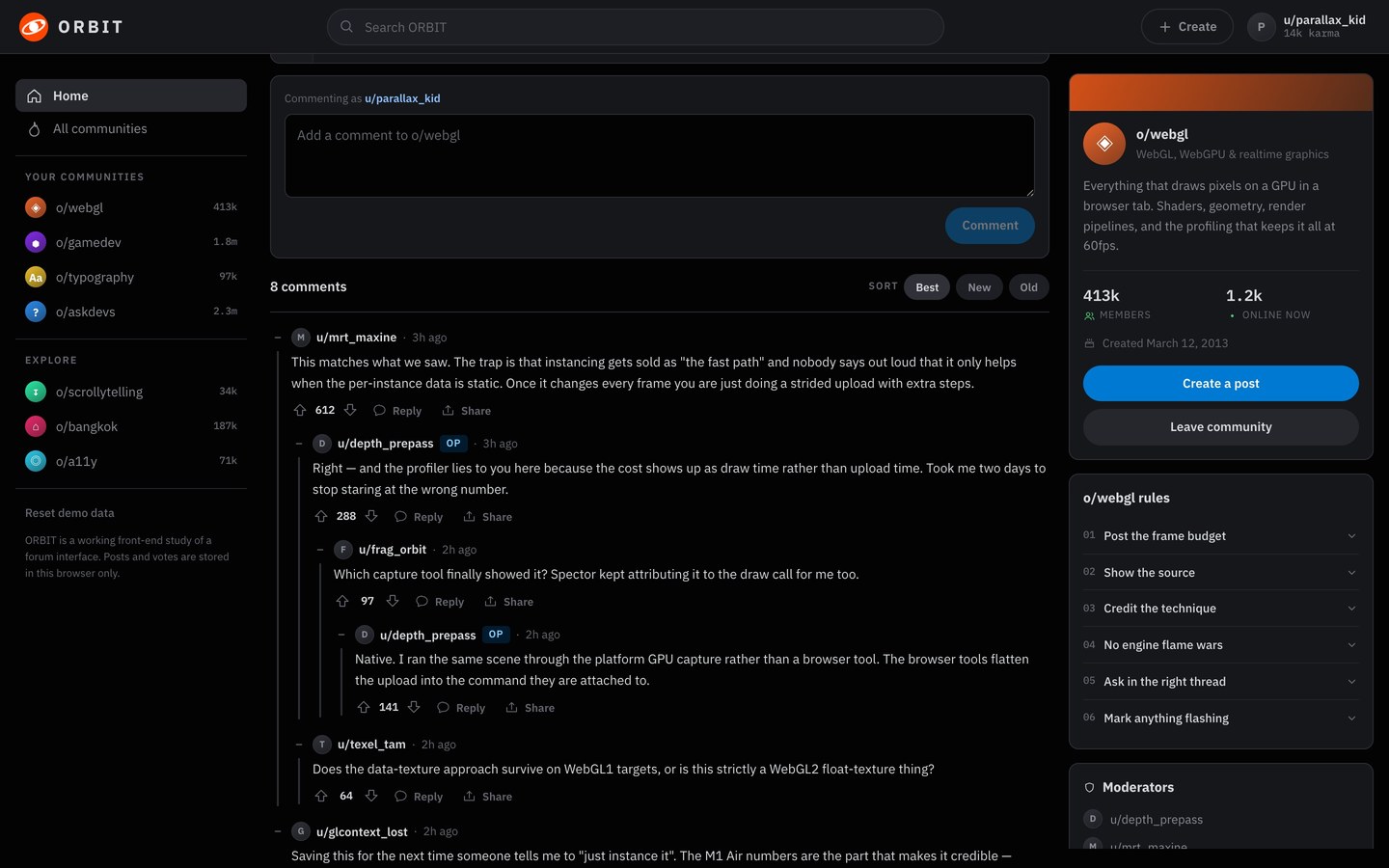
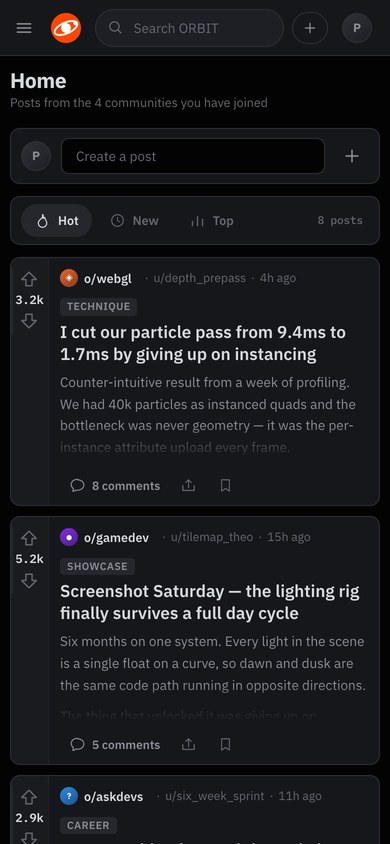
ORBIT is a working forum interface. A sticky banner carries the mark and a central search. Below it, an asymmetric grid holds a community rail on the left, a fluid feed in the middle, and a community metadata and rules card on the right. Every post card hangs off a vertical vote rail whose track doubles as a signed meter: the top half lights orange when you upvote, and the bottom half lights periwinkle when you downvote. A text bar at the head of the feed opens the composer, and posting appends a new block straight into the live posts array. Press a card’s comment button and the whole centre column becomes a thread panel, with the post in full, a comment box, and the replies nested down their own alignment lines. A back link takes you to the feed.
Who this template is for
This build is for anyone who needs a community surface: a product adding discussion, a studio shipping a members’ room, or a developer who wants forum mechanics written plainly enough to lift.
- Products and brands that want a discussion surface with the mechanics people already know (voting, threads, and communities) without renting someone else’s platform
- Developers who want a worked reference for the hard parts: a vote rule that can’t stack, view-state routing without a router, and a recursive comment tree that stays legible four levels down
- Anyone learning front-end state who wants a real application small enough to read in full: twelve files, with no framework and no build step
What problem this template solves
Most product front ends you can open and read are either a framework tutorial with three fake rows in it, or a real app whose logic is buried under a build pipeline. This build is neither.
- Interface clones stop at the layout, and the mechanics that make the product work are left as an exercise
- State rules are the hard part, and they’re exactly what a screenshot can’t show you
- A build behind a bundler is a build you can’t read: the file you open isn’t the code that runs
What you get with this template
Twelve files and an index.html. Open it and the forum runs, with no install, no bundler, and no server.
- The full two-view application: the feed with its three-column grid, the composer, and the thread panel with its nested reply tree and back link
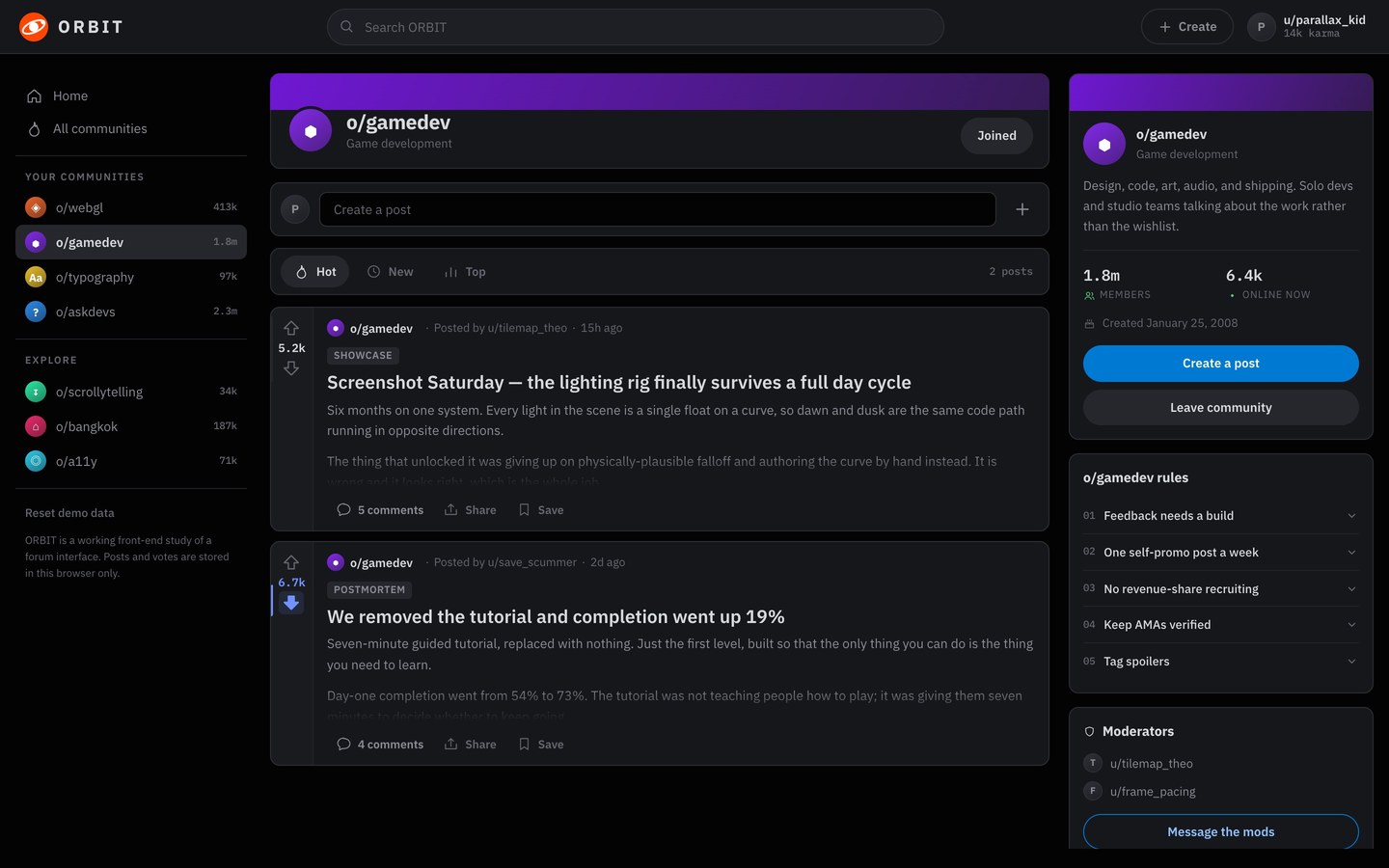
- Seven seeded communities with their own hue, rules, moderators, and member counts, plus twelve seeded posts carrying full comment trees four levels deep
- The mechanics in readable files: the vote rule, the hot-sort gravity, the focus-preserving re-render, and localStorage persistence with a version key that discards stale saves
Page sections overview
| Section | Purpose |
|---|---|
| The vote rail | Two arrows that work as a signed meter. |
| The one-step rule | Pressing harder does nothing, by construction. |
| The composer | A text bar that becomes a form and appends to the array. |
| The thread panel | The comment button changes the view, not the page. |
| The reply tree | Alignment lines that are also the collapse control. |
Design and branding system
The design brief was a room built for reading at night: a quiet ground, one loud accent, and colour used only where it carries meaning.
- A near-black ground with four raised greys, so cards, rails, and popovers separate by elevation instead of by borders shouting at each other
- Two signal colours and no more: ember for up, periwinkle for down. Every other coloured pixel is a community’s own hue, driven by a single custom property
- IBM Plex Sans for the interface and IBM Plex Mono for every number (scores, member counts, and timestamps), so tallies line up and read as data
Mobile and speed optimization
The three columns fold in stages, so each width gets a layout that was designed for it.
- The right rail drops below 1260px and the left rail becomes a drawer below 960px, reachable from a banner control and dismissable with Escape or a tap outside
- Below 720px the byline shortens and action labels give way to their icons, so a post card’s metadata still fits on one line at 390px
- There’s no horizontal overflow at any width. That was measured at 1440, 1180, 900, and 390px instead of judged by eye
How this template helps you convert
A working product beats a mockup. The page is arranged so a visitor can use the thing before deciding anything.
- Visitors use it right away, because the live build is on the page with no signup or install in the way
- Every mechanic is inspectable, which turns a curious visitor into someone who wants the brief behind it
- Paying once for the prompt is a concrete next step while the product is still open in the tab
Other information about this template
A few notes before you build on this one.
- Classic script tags in dependency order, the same no-build convention as this studio’s browser games. It opens straight off disk with no server and no bundler
- All user text is written through textContent. The one markup escape hatch exists only for the trusted inline icon constants, so a post body can never become markup
- State persists to localStorage behind a version key, so changing the seeded data discards stale saves instead of half-merging them
- Cloned from the layout, mechanics, and dark identity of a well-known link aggregator, and branded ORBIT on purpose, with its own mark, palette, and copy, so it doesn’t impersonate a real service
The voting rule
The brief’s hardest requirement is one line of arithmetic: next = (prev === dir ? 0 : dir). Because the stored vote only ever holds −1, 0, or 1, a reader can never move a score more than one step from the tally they arrived at. Pressing the same arrow twice retracts the vote, and the opposite arrow moves the score by two, so it lands one step on the other side. At boot, the app replays a mashed sequence against a probe object and logs an error if the drift ever escapes that range.
How it’s built
Classic script tags load in dependency order, the same no-build convention as the studio’s browser games. So the file you open is the code that runs, and it opens straight off disk. There’s one state object, one notify() fan-out, four re-rendered regions, and no virtual DOM. Every element is built through a small hyperscript helper that writes user text with textContent, so post and comment bodies can never become markup.
Screenshots
Captured from the live build, section by section, exactly as the template renders.