Quick summary
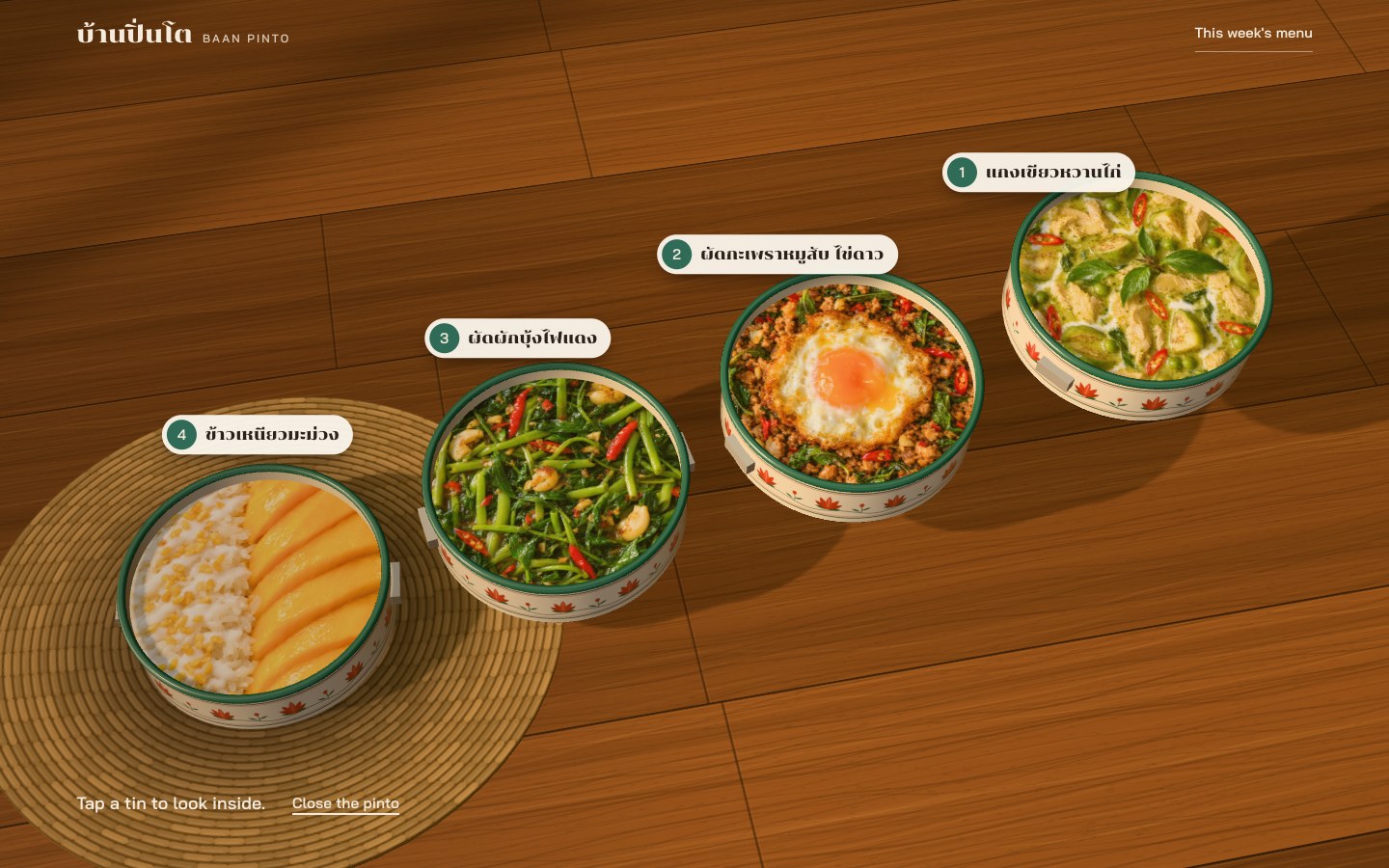
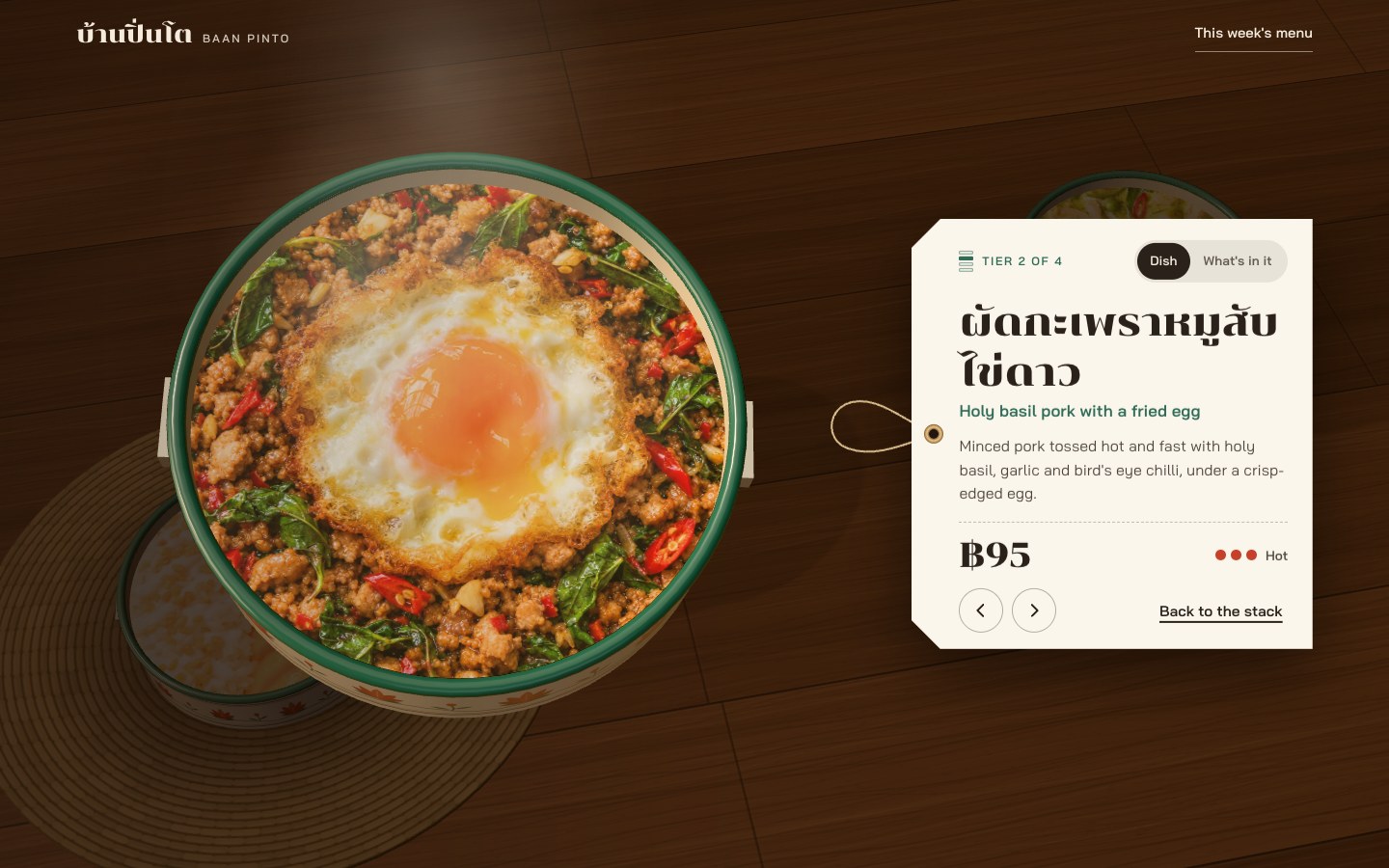
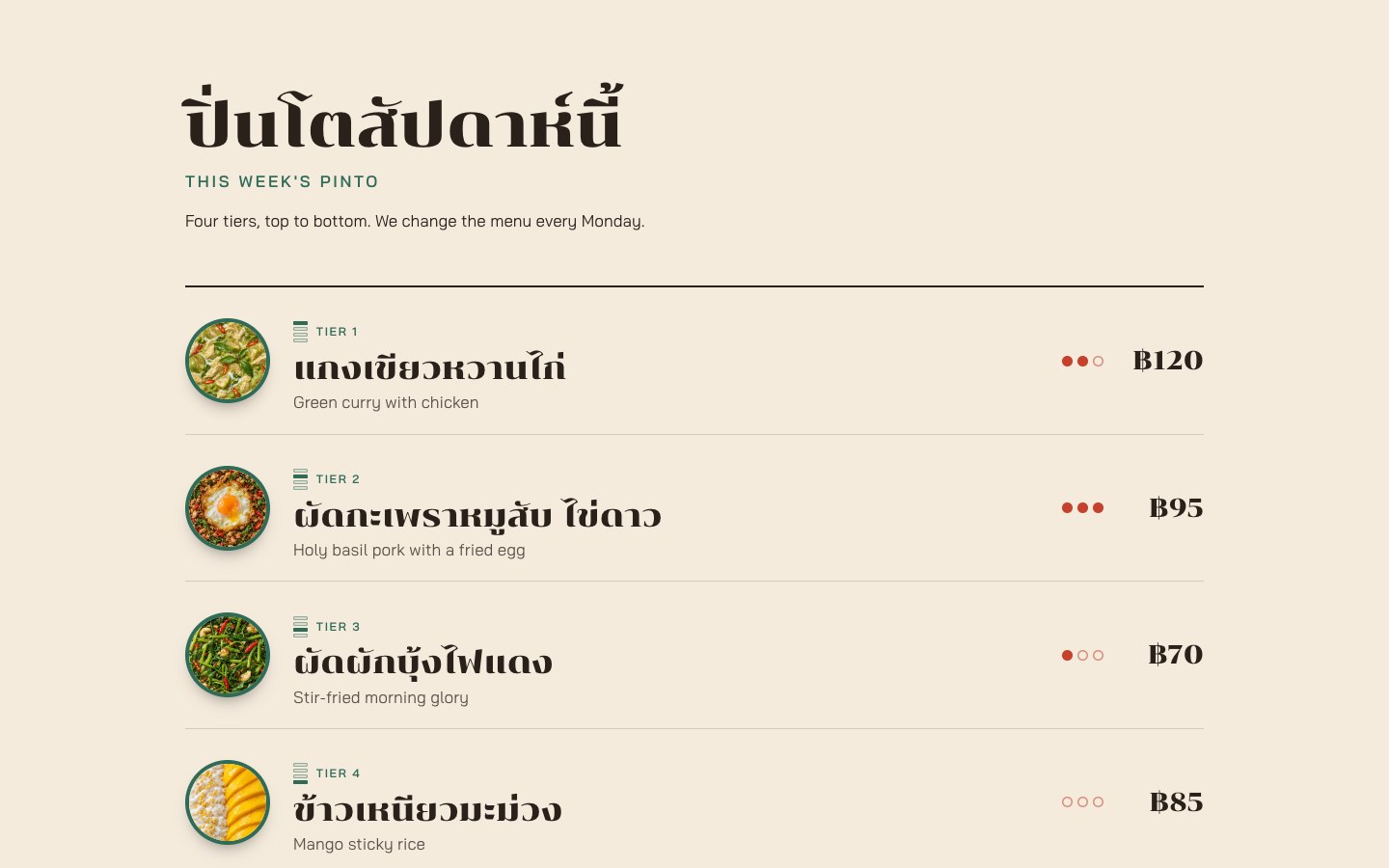
Baan Pinto is a landing page for a lunch delivery kitchen, shown here as a made-up Bangkok kitchen that brings a home-cooked Thai lunch to office desks in a pinto, the stacked enamel lunch carrier. The first screen is one pinto drawn live in 3D on a teak table in morning light, with a Thai headline and an Open the pinto button on its left. Open it and the carrier lifts away, the lid rises out of the picture, and the four tins spring apart into a row so the camera can look into each one. Every tin holds a photo of its dish and a label with its number and name. Tap a tin and it comes up to the camera while the rest of the table dims and a little steam rises, with a price tag beside it: the Thai and English names, one line about the dish, the price in baht, and chilli dots for the spice level. A switch turns the tag over to the ingredients and allergens. Below the hero come this week’s menu as four rows, how ordering works in three steps, the hours and delivery area, and one Order on LINE button. The four dish photos are computer generated.
Who this template is for
This build is for a food business with a short menu that changes, like a lunch delivery kitchen, a weekly meal plan, a bento or tiffin service, or a café with a set of the day. It suits a kitchen that wants its page to feel like opening the meal itself, not reading a grid of cards.
- Kitchens with a small set menu, three to five dishes that go together, where each one deserves a close look
- Owners who can get a square, top-down photo of each dish, or have one made, and want to change the menu every week
- Teams who take orders in a chat app and need one clear button, not a shop. The dishes, prices, spice levels, ingredients, and allergens sit in one list at the top of one script
What problem this template solves
Most food pages show the menu as a grid of cards or a PDF. Every dish looks the same, the set price gets lost, and nothing on the page feels like the food arriving.
- A grid of small photos says nothing about how the dishes come together as one meal
- Ingredients and allergens hide in a footnote or on another page, so people with allergies have to ask
- A 3D product viewer usually means a heavy model file, a loading bar, and a page that traps the scroll on a phone
What you get with this template
You get the finished page with all three states working on a desktop and on a phone, plus a plain menu below it that works without 3D.
- The pinto: a four-tier lunch carrier drawn live in 3D from simple shapes, with painted flower bands, on a teak table in morning light. It opens, the tins stand apart, and each tin holds its dish photo
- The price tag: tap a tin and it comes to the camera with a tag beside it that gives the Thai and English names, one line, the price, the spice level, and a switch that turns it over to the ingredients and allergens
- The page below: this week’s menu as four rows with round photos, the set price, how ordering works in three steps, the hours and delivery area, and one Order on LINE button
Page sections overview
| Section | Purpose |
|---|---|
| The closed pinto | Put the real object on the first screen |
| Opening | Let the four tins stand apart |
| The tins | Show the food inside, all at one size |
| Focus | Bring one dish up to the camera |
| The price tag | Answer what people ask about lunch |
| This week’s menu | Keep a plain menu under the 3D |
| Ordering | End on one clear way to order |
Design and branding system
The page should feel like a Thai home kitchen at eight in the morning: warm, calm, and a little nostalgic.
- Paper cream (#F4EBDD), ink brown (#2A211B), jade (#2F6B57), chilli red (#C5412B), brass (#B8894A), and teak (#7A4A2B). The hero is dark teak, the menu sits on paper, and how it works is deep jade
- Two typefaces that cover Thai and Latin: Chonburi, a display face with character, for the Thai names, prices, and headings, and Bai Jamjuree for the text. Thai comes first and large, with English under it. Both are self-hosted woff2 files
- The flower band, the lid petals, the teak grain, and the woven mat are painted in code on canvases, and the reflections come from a small room of light cards baked once. There are no model files: the only pictures are the four dish photos
Mobile and speed optimization
All three states work on a phone at 390 pixels wide, and nothing scrolls sideways.
- On a phone the headline sits at the top and the button at the bottom, the open tins climb in a zigzag, the labels show only their numbers, and the price tag is a bottom sheet you can swipe sideways to change tier
- The 3D lets an up or down swipe scroll the page, and only a sideways drag turns the pinto. It stops drawing when the hero is off screen or the tab is hidden
- The pixel ratio is capped at 2, and at 1.5 on a phone. The scene is at most about 13,900 triangles and 43 draw calls with no post-processing, and every state held 60 frames a second in Chrome at desktop and phone sizes. Visitors who ask their device for less motion get short fades with no sway or steam
How this template helps you convert
The page works like lunch arriving. People open it, look inside, and the one way to order waits at the end.
- The first move is one tap on the object itself, and it pays off at once: four real dishes, in the order they are packed
- Each tag answers the questions that stop a lunch order: what it is, how hot it is, what it costs, and what is in it, allergens included
- There is one action on the whole page, Order on LINE, after the menu, the steps, and the delivery area. Point it at your own chat, form, or ordering tool
Other information about this template
A few things to know before you build on this one.
- Baan Pinto is a made-up kitchen, and the four dish photos are computer generated. The dishes, prices, hours, and delivery areas are stand-ins for yours
- The Order on LINE button goes nowhere until you link it to your own account or ordering page. There’s no cart, no payment, and no ordering back end. The menu is one list at the top of the script
- The 3D needs WebGL 2. Without it the page shows a drawn picture of the pinto in its place, the open button gives way to a link to the menu, and the plain menu carries the page
- The pinto is built from simple shapes. The flower band and lid petals are flat painted shapes, not brushwork, and the carrier is straight straps with square corners and no latch. The food is a flat photo inside each tin, so it has no depth and its light doesn’t follow the scene
- Some parts are still plain: the back of the tag leaves empty space, its string is a fixed loop that doesn’t reach the tin, the steam is faint, and on a phone the menu rows are tight, with long Thai names wrapping beside the price
- It was tested in Chrome on a desktop and in phone emulation, with scripted clicks and taps through every state. It hasn’t been tested on Safari, Firefox, or a real iPhone yet, and the Thai copy still needs a read by a native speaker
- The fonts are Chonburi and Bai Jamjuree, under the SIL Open Font License, and three.js is under the MIT License. Their licence notes ship with the page
How it works
The page is one HTML file, one stylesheet, and one script, with three.js and the fonts copied in beside them, so there’s no build step and nothing loads from another site. The pinto is built in code from simple shapes: turned profiles for the tins and the lid, rings, cylinders, and boxes for the rims, lugs, and carrier, with the flower band, the lid petals, the teak grain, and the mat painted on canvases. Its reflections come from a small room of light cards baked once, and the only pictures are the four dish photos, 1024 pixels square. The dishes, prices, spice levels, ingredients, and allergens live in one list at the top of the script, and every tier is also a real button. Without WebGL, a drawn picture of the pinto stays in place and the menu below carries the page. The page code is about 90 KB, three.js about 720 KB, the fonts about 60 KB, and the photos about 1.1 MB.
How it was tested
Every state was run in Chrome at 1440 by 900 and at phone size, 390 by 844 with touch: the closed pinto, the open stack, tins in focus, the tag turned over, the way back, and the page below. Each state held 60 frames a second with no console errors, and the phone layout had no sideways scroll. A keyboard walk, reduced motion, and the page without WebGL were checked the same way. The runs were scripted in Chrome on a laptop set to phone size, so Safari, Firefox, a real iPhone, and a real finger scrolling over the 3D are still to be tested.
Screenshots
Captured from the live build: the closed pinto, the four tins standing apart, one tin in focus with its price tag, this week’s menu, and the phone view.